
Man was that title a mouthful! Yesterday I wrote about an issue we were having with moving class data into and out of JSON data if there is a Date or Time variable included. See this article for details. In that article, I mentioned I was working on a more elegant solution to my workaround and I would update you once I had it working.
I have now tested the solution, and I feel this is the best solution if you must keep the date or time variable as defined. I think defining the variables as Datetime variables when possible is a safer solution as it doesn’t require any additional steps, but sometimes that isn’t an option. And of course, the ideal solution would be for PCSOFT to handle the Date or Time variable between a class and JSON, the same as they do with the HRecordToJSON.
Anyway here are the steps to my solution, in this case, I am dealing with the Supplier table which contains a field called SetupDate which is defined as a Date variable:
In my class, I moved SetupDate out of the PUBLIC section and into the PRIVATE section. I change its definition to a string. I renamed it sSetupDate and I added the serialize and mapping attributes to it, both set to SetupDate. If you don’t know what I am talking about with the serialize and mapping attributes, take a look at this article.

So what did all that do?
First moving it to PRIVATE means that it can’t be seen outside of the class, so a programmer using the Supplier class to populate a screen, report etc., will never even see sSetupDate as being available to use.
Defining it as a string means it will go in the JSON as YYYYMMDD instead of YYYY-MM-DD, which solves the issue we are dealing with
Then the serialize attribute will rename sSetupDate to SetupDate when it writes the JSON
Finally, the mapping attribute means that the SetupDate in the JSON will populate sSetupDate in the class.
So far, so good, but remember I said the programmer can’t see sSetupDate outside of the class code, so now what?
We create a class property with both read (get) and write (set) access. We declare the property type as a date. In the get if sSetupDate has a valid date we return it otherwise we return a blank (belt and suspenders) And in the set we set sSetupDate to the value.
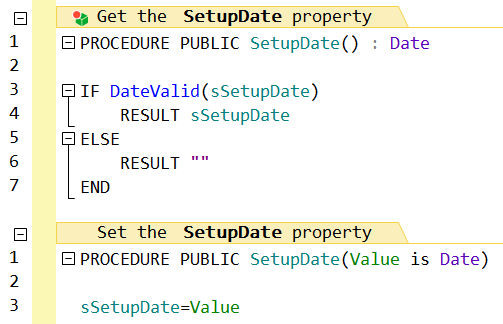
Again what did all that do?
The property is exposed outside the class, and looks like any other variable, so any exists code that worked with Supplier.SetupDate works the same as it always has including lines like this
recSupplier.SetupDate..Date += 7You can’t do that with a string!
So our solution solves the issue without any requirement for any existing code to be updated, and in fact, the rest of the programmers don’t even need to know that SetupDate is not a property.
 wxBlog - All things wx – Covering pcSoft products (WINDEV, WEBDEV, WINDEV Mobile)