

I feel like I have been beating up on PCSOFT a bit with my last few posts, time to talk about something wonderful instead. Did you know there is a complete set of functions to get you a country list with all kinds of info? No need to import and create your own table. Today I am going to show you how we are using it to create an array for use throughout our application
There are 2 functions and a variable type for Country. There are also the same for continents. If you would like to explore on your own this page from the help is a good place to start.
We are going to start by creating an array of the country variables. We have a FixedLookups class in this project for lookups that are hard code or otherwise not user-modifiable, so this is an obvious spot to add this array. We declare this class in our project code as LKP is FixedLookups.
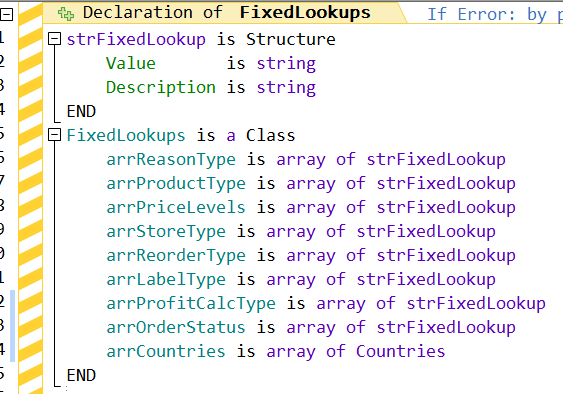
We populate these arrays in the constructor of the class. This is really easy to do with the CountryList() function. Notice I also sort it by name, I can’t quite figure out how it is sorted by default.

Notice my comment about being able to limit to a continent. There are constants (such as continentNorthAmerica) that you can use. Unfortunately, you can not combine them like you can some other functions with constants. So if you need a list of countries for more than one continent, but not all continents you will have to run the statement multiple times and stitch your array together
By the way, if you are curious how many countries there are in the world, google says 195, but my array has 249, If you would like to go through the list and let us know which extra 54 countries PCSOFT has I will be happy to publish your findings 🙂 According to the help, this list is based on the ISO 3166-1 standard at Oct 15, 2019. Have we lost 54 counties in the last 4 years? Anyway moving on.
The country variable contains lots of great info.
- A continent variable with all its info
- An image of the country’s flag
- The 2-character ISO code
- The 3-character ISO code
- The numeric ISO code
- The Name
- The Nation
- This is an integer that can be used with the Nation() function to set the language of your application
- The Phone Number Prefix
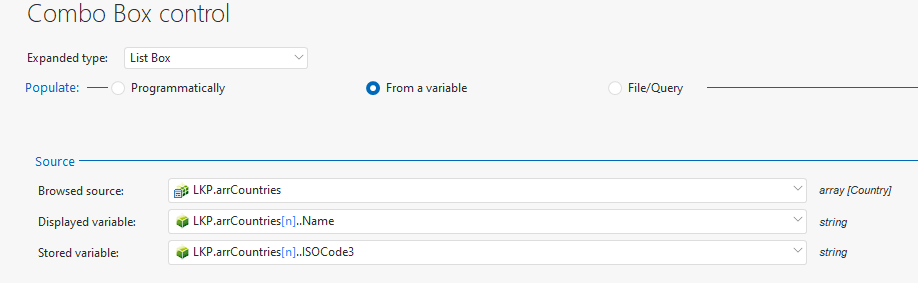
So we have a combo box that we want to populate with country. It couldn’t be simpler now. We use our array as the source, display the name and store the 3-character ISO code
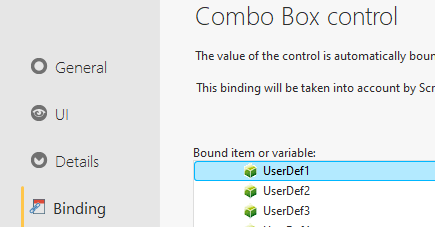
We bind the control to where we are storing this in the database. In this case, it happens to be the UserDef1 in the Supplier record. That whole UserDef1 thing will be addressed in a future database conversion, trust me 🙂
And that’s it we have a country lookup, storing the 3-character ISO code in the database, and if we want or need it we can use that to show the flag, set the default phone number prefix, change the language of the project, etc.
It’s features like this that help make up for the occasional issues I run into like I have the last week!
 wxBlog - All things wx – Covering pcSoft products (WINDEV, WEBDEV, WINDEV Mobile)