

Maybe this setting has been there since they added the “feature” to reopen any tabs you previously had open in HF SQL, but to be honest with you this is the first time I even noticed that there was a settings option for HF Control Center at all, I am sure it was there, but I never noticed it.
Anyway, just in case there is anyone like me who complains about it reopening all the tabs you had open in your last HF SQL session, here’s how to disable it in v2024.

See that unassuming little dropdown icon there? That pops up a menu. I am unsure why they decided this belongs on a dropdown button outside the ribbon bar. Anyway notice there is an options item on the menu.

For the first time, I discovered that there are options for HF SQL control center, it is kind of embarrassing it took me this long to discover.

The option we are looking for is the Remember displayed tabs. Turn that off and finally HF SQL Control Center will open with a clean slate each time.
You can also change it so it displays items in alphabetic order instead of the order they were created, which might make it easier to find them in databases with quite a few tables.
The Data view table gives you options on how the data is shown in tables. I set it to show me Text memos, but only the size of binary memos, not to show composite keys, multiline text, not to show record numbers and show last modified date as a tool tip.

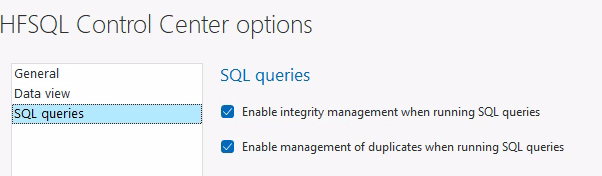
The final tab, I can’t imagine needing to turn the options off other than during specific situations
 wxBlog - All things wx – Covering pcSoft products (WINDEV, WEBDEV, WINDEV Mobile)