

It has been a while since we had a good old-fashioned Uncle Pete rant, lets face if you know me, you know its overdue 🙂 So without further delay, RANT MODE ON!
There were a number of new features added to the code editor with Version 2024. Features 080-086. I always appreciate PCSOFT constant improvements to make me more productive as a developer but one of these features mildly irritates me and one of them I just downright hate!
Feature 085 – errors shown directly in the code.

I thought I hated this feature at first. I find it distracting and not very useful and prefer to just have the red highlighted error and allow me to hover to see the error if and when I need to. The good news is we have the ability to control how this feature behaves via the Home->Options->Options of the Code Editor ribbon bar menu, which is why it no longer incurs my ire 🙂

Feature 081 – Interactive tooltip
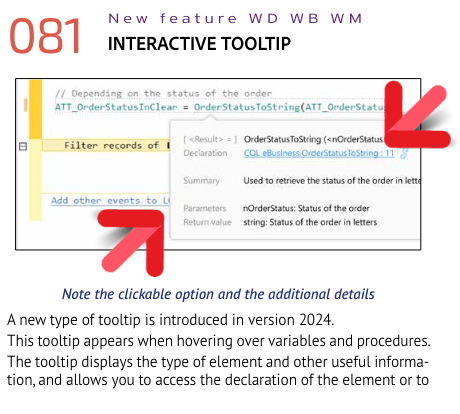
I like the concept of this feature, however the implementation has caused it to be my number one irritant while working. Well, I take that back my number 1 irritant is usually Andy, but feature 081 is running a close 2nd 🙂
My issue is not only is this box distracting but it is interfering with the far more important intellisense features. For whatever reason, my mouse cursor often ends up on the line I am typing. In the screenshot below I started typing mgrMeterReading, and Intellisense correctly gave me the choice of the existing variable. But then as I keyed .filt intellisense should be giving me the .FilterString member from that variable, however it isn’t because the interactive tooltip has been triggered and is overriding the intellisense options. I suspect the reason this happens, I use the mouse to select the first intellisense suggestion (mgrMeterReading) and this leaves my mouse in a location that triggers the hover for the interactive tooltip.

I have been trying to retrain myself to use the keyboard instead of the mouse to select the intellisense suggestions, but we all know the one about old dogs and new tricks and I am a very old dog! This has irritated me so much that I broke down and submitted a request to support to find out if there is a way to disable it. Unfortunately, the answer was that currently there is no way to disable it, but the suggestion has been submitted. 😦
As I said I like the box, it gives useful information and links, such as where the variable is declared with a link, as well as links to other uses of the variable, for procedures it gives you a nice summary as seen in the image above.
We already have the ability to get to that definition by hitting F2 (and Ctrl-F2 to return from that definition). Shift-F2 opens up a cross-reference window that provides information about other uses. IF you don’t like keyboard shortcuts these options are also on the right click menu. Having it in the handy popup box is much cleaner and all the information is in one place, but triggering on hover is KILLING ME!!!! If I could trigger it via a hot key or if the information were incorporated into the right click menu display it would be useful to me without getting in my way.
RANT MODE OFF
 wxBlog - All things wx – Covering pcSoft products (WINDEV, WEBDEV, WINDEV Mobile)