

I receive this question once or twice a year, but since I don’t use the solution often, it always takes a few hours to locate the example code. Therefore, I’ve decided to transform it into an “Uncle Pete’s Quick Tip”.
The Question: “Is there a way to capture the user pressing the ‘Enter’ key while in an edit field?”
I won’t delve into the reasons why you should or shouldn’t do that. There’s plentiful material supporting both sides, readily available through a quick Google search.
Here’s how to perform this task in WEBDEV.
Edit the code of your edit control. We will place the new code in the “Key pressed in xxx (onkeypress browser event)”, which might not be visible right now. WEBDEV does not display all events by default when we are in the code for a control. This is to avoid overload and clutter, thus, only the primary events are shown.
To view an event that isn’t displayed by default, click on the “Add other events to xxxxx” link at the bottom of the events.
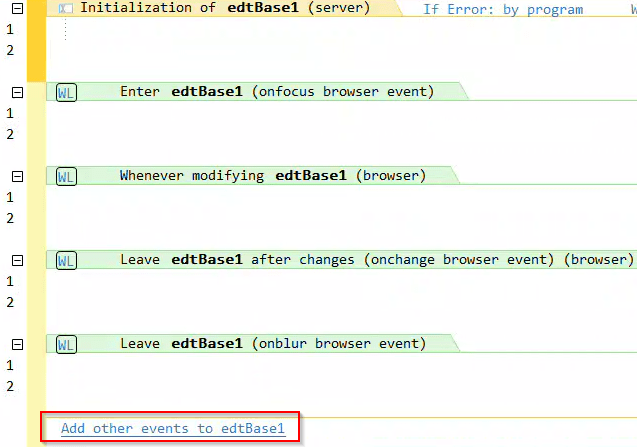
You will see all available events. Select the “Key pressed” event.
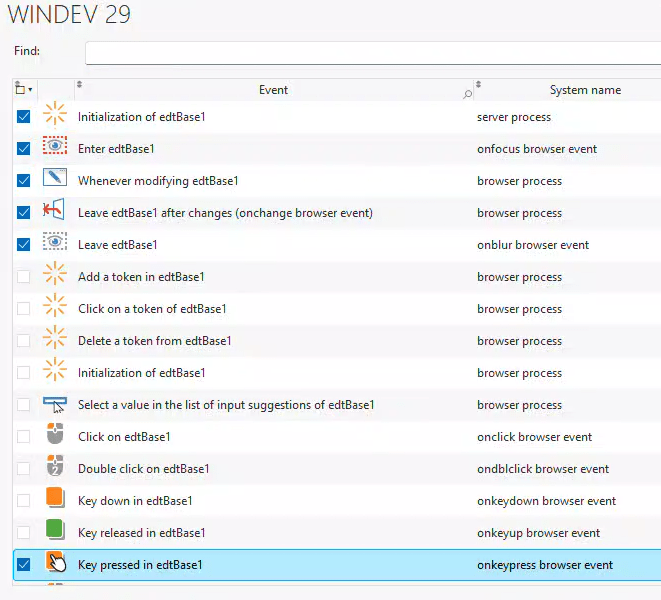
When you close the window, the event will become invisible. We will add the following code to in the event.
nKey is int = JSInfoEvent("keyCode")

IF nKey = 13 THEN
	ExecuteProcess(btnPrimary,trtClick)
END

Naturally, the code inside the IF statement can be customized to your needs. In this example, I am “pressing” a button, such as a save or search button.
 wxBlog - All things wx – Covering pcSoft products (WINDEV, WEBDEV, WINDEV Mobile)