I have found an issue with the HTML Edit control in WEBDEV v2025 45g.
It requires a specific set of circumstances, but it’s was a real pain to figure out what the issue was.
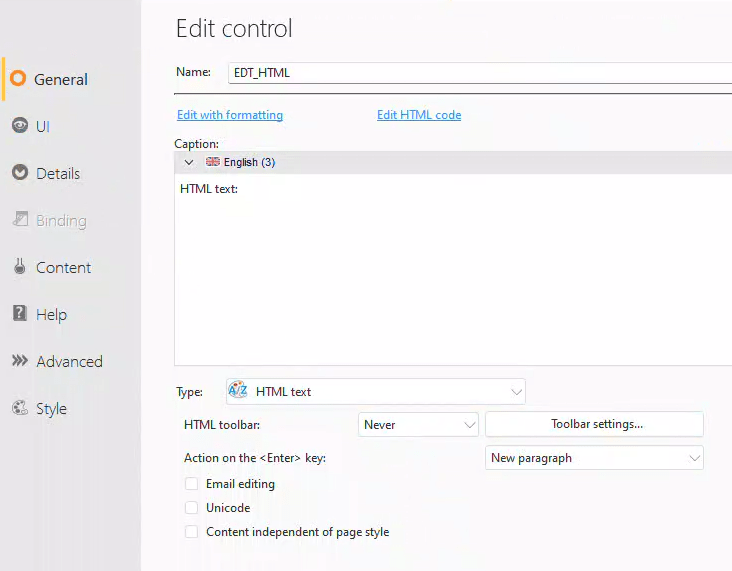
If add an HTML edit control to your page, and set the toolbar to Never.
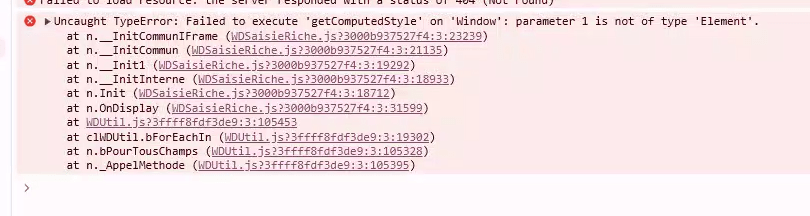
Then if you have any cells that have planes enabled and try to change the plane on one of those cells, or have a popup window and try to do a PopupDisplay() you will get the following JavaScript error.
The real issue is that once you have a JavaScript error on your page, then the rest of the browser code on the page either doesn’t execute or performs unexpectedly.
The only work around I have found is to change the Toolbar setting to Automatic. If you are wondering why we would want a HTML edit control with no Toolbar, we use them in this project to show things like Terms of Service agreements, which are stored in the database as HTML. Using an HTML Edit control without a toolbar and in read only mode, gives the user a nice display that they can scroll and view, even copy and paste from, but can not edit.
Make sure the upgrade file is unzipped keeping the folder tree (path) into the \Programs\ folder for WEBDEV 2025 and if asked accept to replace any existing files. Then use the “”Regenerate the HTML pages”” menu (Project > Other actions > Regenerate the HTML pages) in order to force the rebuild of the site with the upgraded modules.
Before testing your site again, make sure to empty the browser caches.
Update #2
I have confirmed that v2025 Update 1 includes this fix


 wxBlog - All things wx – Covering pcSoft products (WINDEV, WEBDEV, WINDEV Mobile)