
We have uncovered what I consider a fairly serious issue when publishing to an Apache 2.4 server running WEBDEV 2025 45g. The issue is all of the config entries for the site are being placed in the HTTPD config file instead of the appropriate VirtualHost section of the config files. If you are only running one site this might not be an issue, although we did see some issues with the left over and conflicting entries in the VirtualHost section, but with multiple sites and especially multiple Webservices, this can become a serious issue.
Apache uses config files to configure all the settings of the server, The 2 files we are most concerned with are the HTTPD.conf and httpd-vhost.conf. The HTTPD.conf file holds all of the global and default setting for the server and it has a include statement to pull in the httpd-vhost.conf file, which contains all the specific setting for each virtual host you are running on the server.
Prior to version 2025, when you published, the entries WEBDEV needs to make in the config files were correctly added to the appropriate VirtualHost section for the virtual host you are publishing to, which means they only apply when the request is for that virtual host.
However after upgrading to 2025, it is not publishing those setting directly in the HTTPD.conf so they are global settings of the server instead of just applying to a specific virtual host. In many situations this will still work correctly for you, especially if it is a new server and/or only has one website. It may even work for you with multiple websites, but it is definitely not a best practice, as it exposes the shortcut of your project to all domains. For example if you are publishing a project called Project1 to the domain Project1.com, but you also have a Project2.com virtual host on the server.
http://project1.com/Project1 should bring up your site, but http://project2.com/Project1 should not, however because the entries are being made in the HTTPD.conf as global entries now, the http://project2.com/Project1 will now launch your project as well. This exposes projects to the wrong domain, this is troublesome but not the worst problem with this issue.
Where this becomes a serious issue is if you have webservices published for two separate virtual host, and you happen to have the same endpoint name in both of those webservices. Now the server has no idea which one it should run! Each end point of your webservice has corresponding entries in the config files like so:
<Files ApacheTest>
Require all granted
Action application/WEBDEV30-rest /WD300AWP/WD300Awp.exe/REST/wxDemo virtual
ForceType application/WEBDEV30-rest
</Files>
That is an endpoint named ApacheTest that was published as part of my wxDemo webservice project, and if we run the test of the server we will find all works as expected and it returns “This result came from wxDemo”
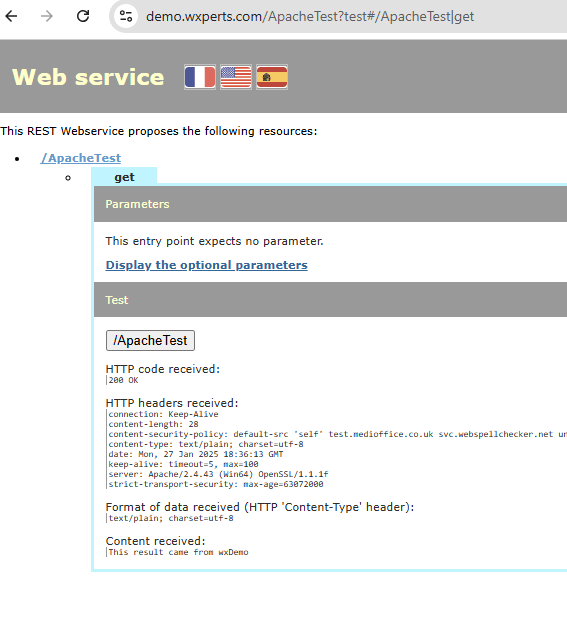
The issue however is I have that same endpoint in a completely different webservice on our Windev-us.com virtual host. If I publish that webservice the entries in the HTTPD.conf are changed to this:
<Files ApacheTest>
Require all granted
Action application/WEBDEV30-rest /WD300AWP/WD300Awp.exe/REST/WinDevUSRest virtual
ForceType application/WEBDEV30-rest
</Files>
Notice it is now referencing the WinDevUSRest webservice and if we run the test we see that it correctly returns “This result came from wxPerts”
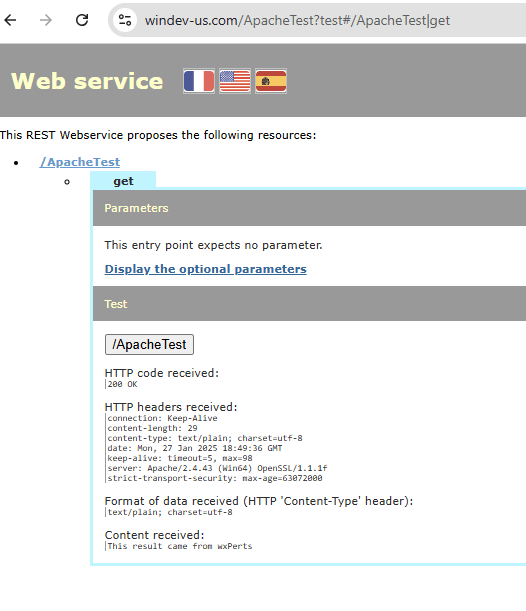
This issue is now if we run our original test of wxDemo, we will see that it is also returning “This result came from wxPerts”

That is because when we published the second webservice, it replaced the original <Files ApacheTest> section that was for wxDemo with the one for WinDev US, because it is in the global section it doesn’t know it isn’t for a different webservice.
What should have happened, is each set of entries should have been added to the appropriate VirtualHost section of the httpd-vhost.conf instead of the HTTPD.conf. Like so:
<VirtualHost *:443>
    ServerName windev-us.com
    ServerAlias www.windev-us.com
    DocumentRoot "C:/Sites/WinDevUS/Site/WinDevUS/WINDEVUS_WEB"
    DirectoryIndex index.awp
	Header always set Strict-Transport-Security "max-age=63072000"
    SSLEngine on
	SSLProtocol all -SSLv2 -SSLv3 -TLSv1 -TLSv1.1
	SSLCipherSuite ECDHE-ECDSA-AES128-GCM-SHA256:ECDHE-RSA-AES128-GCM-SHA256:ECDHE-ECDSA-AES256-GCM-SHA384:ECDHE-RSA-AES256-GCM-SHA384:ECDHE-ECDSA-CHACHA20-POLY1305:ECDHE-RSA-CHACHA20-POLY1305:DHE-RSA-AES128-GCM-SHA256:DHE-RSA-AES256-GCM-SHA384
	SSLHonorCipherOrder off
	SSLCertificateFile "C:\Certbot\live\windev-us.com\cert.pem"
	SSLCertificateKeyFile "C:\Certbot\live\windev-us.com\privkey.pem"
	SSLCertificateChainFile "C:\Certbot\live\windev-us.com\chain.pem"
	Alias /WINDEVUS_WEB/ C:/Sites/WinDevUS/Site/WinDevUS/WINDEVUS_WEB/
	<Directory C:/Sites/WinDevUS/Site/WinDevUS/WINDEVUS_WEB/>
	Require all granted
	AddType text/cache-manifest .manifest
	AddType image/svg+xml .svg
	AddType video/webm .webm
	AddType text/vtt .vtt
	AddType application/wasm .wasm
	AddType text/plain .
	</Directory>
	<Files WinDevUS>
	Require all granted
	ForceType application/WEBDEV30-awp
	</Files>
	Alias /WXWINDEVUS_WEB/awws/ C:/Sites/WinDevUS/SOAP/wxWinDevUS/WXWINDEVUS_WEB/
	Alias /WXWINDEVUS_WEB/ C:/Sites/WinDevUS/SOAP/wxWinDevUS/WXWINDEVUS_WEB/
	<Directory C:/Sites/WinDevUS/SOAP/wxWinDevUS/WXWINDEVUS_WEB/>
	Require all granted
	</Directory>
	<Files ApacheTest>
		Require all granted
		Action application/WEBDEV30-rest /WD300AWP/WD300Awp.exe/REST/WinDevUSRest virtual
		ForceType application/WEBDEV30-rest
	</Files>
</VirtualHost>
<VirtualHost *:443>
    ServerName demo.wxperts.com
    ServerAlias demo.wxperts.com
    DocumentRoot "C:/Sites/demo/SITE/wxDemo/WXDEMO_WEB"
	DirectoryIndex index.html index.awp
	Header set Content-Security-Policy "default-src 'self' test.medioffice.co.uk svc.webspellchecker.net unpkg.com api.assemblyai.com api.stripe.com js.stripe.com hooks.stripe.com 'unsafe-inline' 'unsafe-eval' blob: data:;"
	Header always set Strict-Transport-Security "max-age=63072000"
    SSLEngine on
	SSLProtocol all -SSLv2 -SSLv3 -TLSv1 -TLSv1.1
	SSLCipherSuite ECDHE-ECDSA-AES128-GCM-SHA256:ECDHE-RSA-AES128-GCM-SHA256:ECDHE-ECDSA-AES256-GCM-SHA384:ECDHE-RSA-AES256-GCM-SHA384:ECDHE-ECDSA-CHACHA20-POLY1305:ECDHE-RSA-CHACHA20-POLY1305:DHE-RSA-AES128-GCM-SHA256:DHE-RSA-AES256-GCM-SHA384
	SSLHonorCipherOrder off
    SSLCertificateFile "C:\Certbot\live\demo.wxperts.com\cert.pem"
    SSLCertificateKeyFile "C:\Certbot\live\demo.wxperts.com\privkey.pem"
	SSLCertificateChainFile "C:\Certbot\live\demo.wxperts.com\chain.pem"
	Alias /WXDEMO_WEB/ C:/Sites/demo/SITE/wxDemo/WXDEMO_WEB/
	<Directory C:/Sites/demo/SITE/wxDemo/WXDEMO_WEB/>
	Require all granted
	AddType text/cache-manifest .manifest
	AddType image/svg+xml .svg
	AddType video/webm .webm
	AddType text/vtt .vtt
	AddType application/wasm .wasm
	</Directory>
	<Files wxDemo>
	Require all granted
	ForceType application/WEBDEV29-awp
	</Files>
	<Files ApacheTest>
		Require all granted
		Action application/WEBDEV30-rest /WD300AWP/WD300Awp.exe/REST/wxDemo virtual
		ForceType application/WEBDEV30-rest
	</Files>
After removing the entries from the HTTPD.conf and placing them in the appropriate VirtualHost sections of httpd-vhost.conf like above, when we run the test of the webservice, each domain now returns the appropriate response.
And that is the only work around to this issue at present. Every time you publish to the server, you have to remove the lines from the HTTPD.conf and place them in the appropriate VirtualHost section of httpd-vhost.conf. Once the site is published, the lines often don’t change, so all you need to do is remove them from the HTTPD.conf, but especially if you add or change any endpoints of a webservice then there can be changes and additions to the lines, so it is much safer to always move the new lines from HTTPD.cong and replace the existing lines in httpd-vhost.conf.
Note: Always be sure to restart the Apache Service after making changes to the config files, as Apache only reads and process the file on initial startup.
I have submitted this to support and will update this article once I get a response
 wxBlog - All things wx – Covering pcSoft products (WINDEV, WEBDEV, WINDEV Mobile)