
I upgraded to Update 2 this morning (version 302028) and found a serious issue with Flexbox when used inside a looper.
The Flexbox CSS classes are not being generated correctly with Update 2. This worked correctly in Update 1.
When you add a FlexBox to a looper it now generated the HTML/CSS for the DIV section like this.
<div style=" min-width:727px;" class="DivFlexBox DivFlexBox_zrl_1_A3">Notice the second class name DivFlexBox_zrl_1_A3. If we examine that class we see that is where the flex box settings are contained
.DivFlexBox_zrl_1_A3 {
    flex-direction: column;
    align-items: center;
    min-height: 66px;
}
The issue is that the 2nd row of the looper is generated with a DIV section like this
<div style=" min-width:727px;" class="DivFlexBox DivFlexBox_zrl_2_A3">Notice the 2 instead of 1 in class name. The issue is there is not corresponding class generated in the CSS named DivFlexBox_zrl_2_A3
With Update 1 this class name was generated as DivFlexBox_A3 and was the same for each row of the looper, so the one generated class applied to all rows of the looper
With Update 2 only the first row of the looper displays correctly because there are no flexbox rules applied to any of the other rows.
I have submitted a sample project to support showing this issue. When ran the first row will show the two static fields on top of each other as they should be based on the Flexbox settings, however the other two rows show the static fields side by side because there are not flexbox rules applied do to the CSS issue as you can see in this screen shot
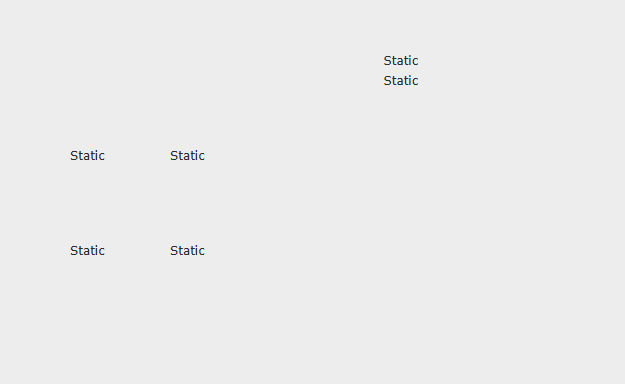
The issue has been submitted and I will update this article once I hear from support
Update 4/5/2025
I have confirmed this issue exist with CSS Grid when placed on a looper as well.
Update 4/7/2025
Confirmed by support and submitted to development Ref 713 003
Update 4/17/2025
This has been resolved in Update 2 – Level 2 (version 302032). Sorry it took me this long to let everyone know but Support never sent me a notice that the bug was fixed or that there was a 2nd update to Update 2.
 wxBlog - All things wx – Covering pcSoft products (WINDEV, WEBDEV, WINDEV Mobile)