

One of our clients was having issues this week with their IDE being very slow. When they would type in the code editor as soon as they would stop typing the IDE would freeze for 5-10 seconds while waiting for intellisense (and AI) to come up with suggestions.
This was happening on 2 different developer machines, and I was able to duplicate it on my machine to a lesser extent (my longest wait was 5 seconds). The issue was it was very inconsistent, it would pause for 10 seconds a few times, then it would work great, then come back. If we edited a different page it would slow down again, we just could never get anything consistent. We tried both repairing the project and deleting the CPL directory, which seemed to help but we were still getting inconsistent results.
Here is a video showing the issue. I type WHEN and space, and as soon as I stop typing there is nearly a 10 second pause where the IDE will not respond, until the Intellisense popup shows, and depending on where I would do the test, the AI suggestions would also show.
There did seem to be some pattern related to the size of the pages, meaning the more controls on the page the more common it was to have the issue, but again it was very inconsistent.
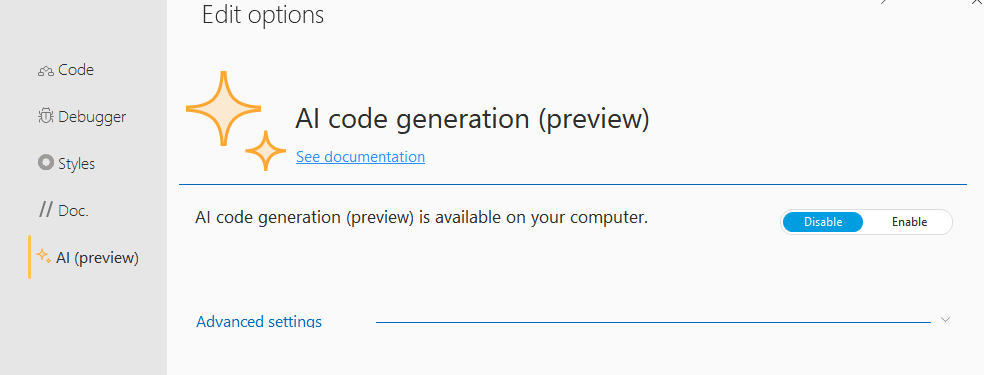
The good news is there appears to be a solution, under the “options of the code editor” on the “AI (preview)” tab you can disable AI, this seems to have solved the issue. I don’t know about you but I have yet to have AI make a useful suggestion on any of my code yet anyway, so I have turned the option off for myself as well.
 wxBlog - All things wx – Covering pcSoft products (WINDEV, WEBDEV, WINDEV Mobile)