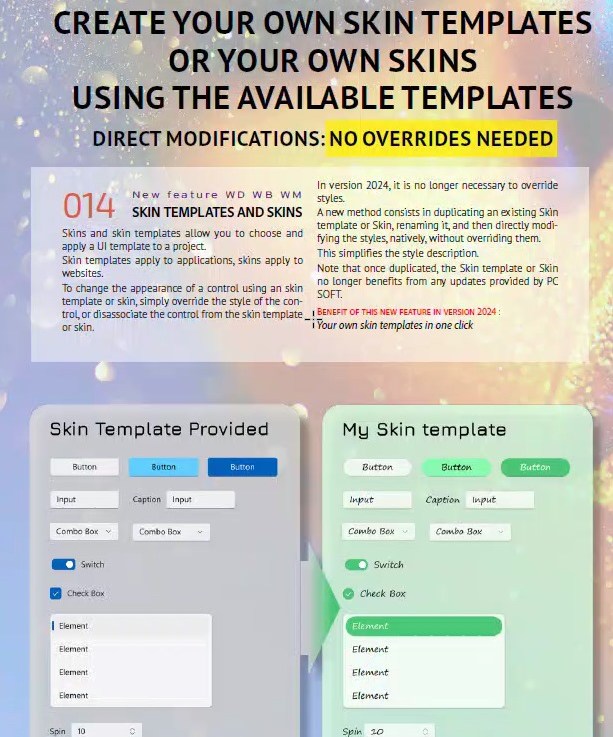
Another exciting new feature added with version 2024 was Feature 014: Customize You Apps: Create You Own Skin Templates or Your Own Skins Using The Available Templates. Unfortunately, you won't find any mention of this feature in the help section. But don't worry, Uncle Pete is here to save the day! What does this mean … Continue reading Creating Your Own WEBDEV Skin
Category: WEBDEV
Detecting the Enter Key on an Edit Control
I receive this question once or twice a year, but since I don't use the solution often, it always takes a few hours to locate the example code. Therefore, I've decided to transform it into an "Uncle Pete's Quick Tip". The Question: "Is there a way to capture the user pressing the 'Enter' key while … Continue reading Detecting the Enter Key on an Edit Control
Tablet First Layout with WEBDEV and Tailwind CSS. No CSS Grid. No Flexbox. No JavaScript.
I've never hidden my thoughts about Responsive Design. While it's great for content sites, it may not be suitable for web applications, which most of us create. It seems unrealistic to expect Responsive Design to produce a web application that looks and functions well on every device, from an iPhone SE to a 50-inch 4K … Continue reading Tablet First Layout with WEBDEV and Tailwind CSS. No CSS Grid. No Flexbox. No JavaScript.
Evidence that Tailwind CSS could be the droids we are looking for!
I received a request today for help creating CSS styling for placeholders. Styling placeholders falls outside the scope of standard WEBDEV style settings, meaning pure CSS is the only option. This involves challenging, vendor-specific CSS. However, Tailwind CSS comes to our rescue! What is a placeholder? First, let's define what a placeholder is. We'll start … Continue reading Evidence that Tailwind CSS could be the droids we are looking for!
Dipping our WEBDEV toe into the Tailwind CSS pool
Now that I've persuaded you that Tailwind CSS is the solution to all your WEBDEV challenges, it's time to start using it. This article details my first experience with Tailwind CSS in WEBDEV, some of the problems I encountered, and in true Uncle Pete style, workarounds to overcome these issues. If you missed it, make … Continue reading Dipping our WEBDEV toe into the Tailwind CSS pool
WEBDEV meets Tailwind CSS
One exciting feature of version 2024 is the support for Tailwind CSS. This addition not only offers an avenue for working with web designers who aren't necessarily WEBDEV developers, but it also signifies PCSOFT's commitment to standard web technologies. As hinted in several of my recent posts, a series of upcoming articles will delve into … Continue reading WEBDEV meets Tailwind CSS
Adding Authenticator App Support to your WEBDEV site
From version 26 onwards, adding Authenticator App support to a WEBDEV site has become effortless. Authenticator apps generate Time-Based One-Time Passwords (TOTPs), offering a more secure and convenient approach to Two-Factor Authentication (2FA) compared to email or text messages. What is an Authenticator App and Why Should I Care? Authenticator apps are applications that facilitate … Continue reading Adding Authenticator App Support to your WEBDEV site
Password Hash Primer for WEBDEV
This is a refreshed version of an old article from our original blog, the one where all the images were unfortunately lost. Today, one of our clients needed a primer on best practices for user login. I thought it was a good time to revisit this topic and discuss the changes that have occurred in … Continue reading Password Hash Primer for WEBDEV
Add an HTML 5 QR Reader to your WEBDEV Site!
Previously exclusive to native apps, advances in HTML5 and WEBDEV's consistent improvements in supporting web standards now enable access to local hardware, location information, and much more. This development further blurs the distinction between "Web Application or Native Application." Today, we will explore how to add the ability to scan a QR code from our … Continue reading Add an HTML 5 QR Reader to your WEBDEV Site!
Buttons are good, Links are Evil?
A bug in the Link control that causes issues with captions containing accented characters can be resolved by changing the links to buttons. This workaround involves selecting the Link Control, choosing “Refactoring and swapping” on the Modification tab, and selecting Button/Link from the switch section. Additionally, using buttons instead of links provides more control over design and functionality, including the ability to use HTML captions and Icon Fonts.


You must be logged in to post a comment.