
Gavin Webb, brought me an interesting CSS issue today with the new HTML Edit Control, that I wanted to share with everyone. Along with solving a specific issue, I think it is a good exercise in understanding how I figure out and then solve this types of CSS issues.
The Issue
This example has two identical HTML Edit controls with only one difference. The content of both is identical, both actually specify that cat should be red and mat should be blue. But as you see the first control shows correctly the second one does not.

The difference is that the second control has a style on it that is defaulting the font color to light gray. Before you get two excited and say well just don’t do that, I should mention in the real project, even if the styling was set to undefined this issue still happened because WEBDEV is picking up a color from somewhere that it wants to us.
Find the Problem
Many of you can probably guess I am about to go into the browser developer console 🙂 So Ctrl-Shft-J or whatever it is on your browser and inspect the line that isn’t displaying correctly

We can see there are Span tags with inline CSS styling around cat and mat, but they are not working for some reason. So my first attempt is almost always to add the !important attribute which keeps other CSS from overriding this CSS

No help, it still wasn’t displaying correctly, so time to dig deeper, so I switch to the computed tab. This shows the actual CSS assignments after all the cascading has taken place, and sure enough it says it should be red

This had me stumped for a moment until we scrolled down a bit further and notice that there is a -webkit-text-fill-color and it is set to the gray we are seeing.

I won’t dive deep into what webkit is other than to say it is the rendering engine of Chrome, Safari, Edge, and many others. It is part of what saved us from the browser wars. The -webkit CSS extensions are a set of extensions that the webkit engine will use. A quick googling gets us this definition of CSS in question
The -webkit-text-fill-color CSS property specifies the fill color of characters of text. If this property is not set, the value of the color property is used.
So there you have it that is overriding our color setting. We can further prove that by adding the CSS to the span to set it to red. This is why I like the developer console it lets me test these things on the live page! So I change the inline CSS of that Span tag to this and sure enough, cat now shows in red!

The next step is figuring out where that entry is coming from since it isn’t part of our Span, it must be cascading down from some other CSS. First I reload the page to get rid of any changes I made to the CSS. Then back to inspecting Cat and the Computed tab. When I hover over that entry in the Computed tab notice the Right Arrow Icon appears

Clicking that takes me over to the styles tab and shows me where this CSS is coming from.

And we see it was inherited from a class name “wbSaisieRicheIframeBody” which is on a body tag. That gives us a hit where to find it, so back over on the elements tab we don’t have to look far to see the body tag is right above it. This is all part of the HTML and CSS WEBDEV is generating for an HTML Edit control.

So my next test is to remove that CSS from that body tag, and when I do sure enough cat now shows in red and mat shows in blue just like the other control
Solve the Problem
So now we know what the solution is it’s time to figure out how to accomplish that via WEBDEV. As I mentioned above not doing the styling was the answer because, in the real project, WEBDEV is still picking up a setting from somewhere. So that means we need to use jQuery to remove the entry.
You all have heard me say this before, “Between me and Google we know everything.”, We are now entering the area where Google knows :-). Some quick googling reveals that simply doing
$(selector).css("-webkit-text-fill-color","")will accomplish that. But after trying several selectors and not getting anywhere, it was back to the drawing board Google, where we learned that you have to jump through a lot more hoops for elements inside an iframe. We actually needed something like this, with the selector being the iframe.
$(selector).contents().find("body").css("-webkit-text-fill-color","")Back over on the Elements tab of the console we see that the id of the iframe is A3_EDT, so the JavaScript version of our code is
$("A3_EDT").contents().find("body").css("-webkit-text-fill-color","")Now we just need to execute that code in WEBDEV. It will be browser code and we want it to run when the page loads, and we use the jQuery function to execute jQuery. So our code becomes
jQuery("#A3_EDT").contents().find("body").css("-webkit-text-fill-color","")
We run our page and sure enough, problem solved.

Bonus Material
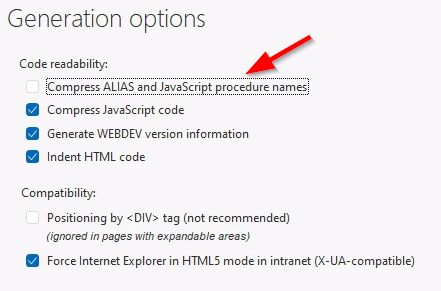
We could stop here but that isn’t the Uncle Pete way 🙂 that A3_EDT is coming from the WEBDEV control Alias, and why when I work with jQuery I always turn off the “Compress ALIAS and JavaScript procedure names” on either the page or the entire project
And now if we run the page we see that the iframe id is EDTBAD_EDT, the WEBDEV control is named edtBad, so that makes a lot more since than A3 and will sure be easier to debug down the road.
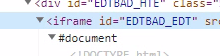
Of course, our WEBDEV code also needs to change
jQuery("#EDTBAD_EDT").contents().find("body").css("-webkit-text-fill-color","")In Gavin’s project, he has several HTML edit controls, so a more generic solution would be better for him. The following code applies the jQuery to every iframe on the page.
jQuery("iframe").contents().find("body").css("-webkit-text-fill-color","")Danger Will Robinson!
As always when you start doing this like this there can be unintended consequences, especially if you have an iframe that you want to affect the font default color.
The Real Fix
The real fix for this needs to come from PCSOFT. They should not be generating the styling of the iframe with -webkit CSS entries, as they will override any standard CSS of the control’s content.
 wxBlog - All things wx – Covering pcSoft products (WINDEV, WEBDEV, WINDEV Mobile)
Great article and nice find!
LikeLike