

Today I bring you some issues with using Date or Time variables and serializing JSON data in and out of classes. Can you tell I am having a rough couple of weeks?
Another day, another support request created. I seem to be getting good at those at least!
Today’s issue is that the JSON generated from a Class instance is different than the data generated when using HRecordToJSON, even though both are defined with the exact same variable types.
Why do I care? Because I am a caring person, everyone says so! 🙂
Here’s the deal. Anyone that knows the wxFileManager, knows that we basically turn every database table into a record class, and then manage those via arrays and some fancy class code. With the addition of our new wxRestManager, we are able to leverage that to create a RESTful service that knows how to work with all of our database tables and enables us to code our client application the same whether we are using a RESTful service or direct database connections.
The key to all that is moving the database tables into record classes, those record classes moving into JSON, out through the RESTful web service, to the client, when they get turned back into record classes. And of course the exact reverse path from the client record class to JSON to the RESTful web service, to the record class to the database. All of this without any specific coding and translation of individual fields.
But we have hit a snag, datetime variables translate correctly, however, date or time variables do not.
Let’s look at some code that shows the issues:
We start with a simple HF Classic data table (HF SQL, PostgreSQL, etc. all demonstrate the same issue BTW)
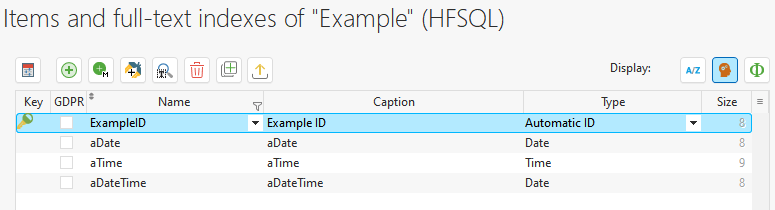
Note aDataTime is actually defined as a DateTime via the subtype

And here is our record class that is defined identically. In fact we used the analysis table to create the class!
Example is a Class
	ExampleID	is 8-byte int
	aDate		is Date
	aTime		is Time
	aDateTime	is DateTime
END
I created a record in the table with the fields populated with the current date and time, and then we begin my example code
HReadSeekFirst(Example,ExampleID,1)  // Retrieve Record

recExample is Example // Declare instance of Class

FileToMemory(recExample,Example)  // Move Record into Class
Get the record, create an instance of the class, and move the record into it. Nothing we don’t do a 1000 times a day around here. This is the output of my data
	Date = 20230926
	Time = 091429347
	Datetime = 20230926091429347
So far so good. Now we move the record class into JSON
jsonExample is JSON <= recExample // Move Class into JSONAnd the output of our JSON data looks like so
	Date = 2023-09-26
	Time = 09:14:29.347
	Datetime = 2023-09-26T09:14:29.347
All looks good but we will soon find out it isn’t. Let’s declare a new instance of the class and try to move the JSON data back into it
newExample is Example   // Declare new Instance of Class

newExample <= jsonExample  // move JSON into Class
And if we look at the data in this new class instance
	Date = 2023-09-
	Time = 09:14:29.
	Datetime = 20230926091429347
Houston we have a problem, Date and Time are not valid Date or Time variable. Notice however Datetime is indeed correct.
If we use the HRecordToJSON function to move the data from the Database Table record to JSON with code like this
tmpJSON is JSON <= HRecordToJSON(Example) // Use HRecordToJSON
jsonExample2 is JSON <= tmpJSON.Example  // remove the extra parent Element
Note the extra step of going through tmpJSON and then into jsonExample2 is just to remove the parent Element created by HRecordtoJSON, so the rest of our code is the same. The result would be exactly the same if we didn’t do that and instead added the parent into our variable names in the rest of our code. Here is the JSON produced
	Date = 20230926
	Time = 091429347
	Datetime = 2023-09-26T09:14:29.347
Notice anything different about that date and time field? No formatting. Even though both the class and the HF table and defined with the same variable types, the JSON is created differently. Just to verify this version of the JSON will get back into the class correctly let’s take a look at that code
newExample2 is Example   // Declare new Instance of Class

newExample2 <= jsonExample2  // move JSON into Class
The JSON produced, is indeed correct?
	Date = 20230926
	Time = 091429347
	Datetime = 20230926091429347
Now What?
You might think I have my solution, but if that were the case I probably wouldn’t be writing this article would I 🙂
There are a number of issues. First I need to able to get my JSON from the class instances. Our entire development paradigm is based on that. And even if I could reverse engineer HRecordToJSON into our solution, that only works with single records, we are often moving arrays of record classes with 1000’s of records in and out of JSON. That happens nearly instantaneously when moving the array. If I had to process each record individually to use HRecordToJSON or some other code to adjust the fields on each record, performance would be greatly affected.
You might think that the Mapping or Serialize attribute that I wrote about last week, or perhaps one of the Serialize functions to JSONtoVariant, or JSONtoString or something might help. But trust me we beat on this for quite some time and none of those provided a seamless solution.
What is the solution? , you ask. Well #1 would be PCSOFT making a Class to JSON conversion work the same as HRecordtoJSON, but I doubt I am going to get that solution today 🙂
Option #2, is to only use Datetime variables in your database, and generally what we do anyway. This would be a great solution if we could make sure that everyone else designed their databases that way as well. But again if I had that kind of power over time and space, I probably wouldn’t be writing this article.
Option #3, and Option #4 are a toss-up as two which is better both have pros and cons. Both options hinge on the fact that if the field is declared in the class as a string, instead of as a Date or a Time then the resulting JSON is correct. Which BTW, gives us some insight into what is happening in the HRecordToJSON as well.
So with both options, I define my record class with the date and time variables as strings
Example is a Class
	ExampleID	is 8-byte int
	aDate		is string
	aTime		is string
	aDateTime	is DateTime
END
With Option #3 I leverage a compiler directive to declare them as strings in the Web service so they get translated correctly into JSON, but declare them as Date and Time variables everywhere else.
Example is a Class
	ExampleID	is 8-byte int
	<COMPILE IF ConfigurationType=Webservice>
		aDate		is string
		aTime		is string
	<ELSE>
		aDate		is Date
		aTime		is Time
	<END>
	aDateTime	is DateTime
END
This solution seems fairly elegant and allows us to share the class between multiple configurations or projects without any coding changes or having two versions of the class. However, I believe we are going to run into the same issue when we go to push the data back up to the web service. I haven’t fully tested it yet, as I wanted to get this documented and off to support and you good folks first.
That leaves us with Option #4. Declare them as strings and then use class properties to have versions as Date and Time variables so we can use all the great Data and Time specific functions of WL
The Get Property for Date would look like this
PROCEDURE PUBLIC aDateAsDate() : Date

IF DateValid(aDate) THEN
	RESULT aDate
ELSE
	RESULT ""
END
And the Set Property like this
PROCEDURE PUBLIC aDateAsDate(Value is Date)

aDate = Value
The download to this solution is developers now have to know to use the Property instead of the real variable and part of the point of the wxFileManager is to make it easier on developers, not harder.
I think there may be an even more advanced version of option #4 involving PRIVATE members, as well as the serialize and mapping attributes. I will be testing that solution shortly and will update this article with my findings.
So now I am off to submit the bug report version of this post, and then hopefully I can make it through a couple of days without writing another one of these post!
=== Update 9/27/2023 ===
As promised I figured out my final workaround for this issue, and have tested it now. See this article for the details of that workaround.
=== Update 9/28/2023 ===
I heard back from support, and it turns out that somehow in all my testing I managed to miss one combination of commands that does work. If we move the resulting JSON into a buffer, and then deserialize it date and time variables are handled correctly. If we use these to lines of code to move the JSON data into our record class
tmpBuffer is Buffer = jsonExample
Deserialize(newExample,tmpBuffer,psdJSON)
Instead of this line of code
newExample <= jsonExampleThen the date and time variables are not corrupted. I have followed up with support to find out if this is still going to be considered a bug and submitted to the developers to be corrected. I believe it is a bug. Serialize and Deserialize should work the same whether you are calling the function or if you are or if it is happening automatically during the assignment statement.
Hopefully, they will agree but in the meantime, this is a better workaround than my previous solution.
=== Update 9/29/2023 ===
Great news, support tells me that this issue has been assigned to the development team.
The development team was asked to add a transformation adapted to this specific case.
From Support
In future versions, it will be possible to assign a JSON, without using the Deserialize function.
 wxBlog - All things wx – Covering pcSoft products (WINDEV, WEBDEV, WINDEV Mobile)
Fantastic work Pete! This is a serious problem and hopeful that fix this!
LikeLike