

One of the members of our Facebook group was asking for some assistance summing the arrays of the wxFileManager classes, so I decided to put this primer together.
Let’s go with a typical example, a Parent/Child relationship between OrderHeader and OrderDetail. First, the header record class so that it includes the child manager class. We won’t do the entire Child in Memory management stuff in this article, that is covered here, if you are interested.
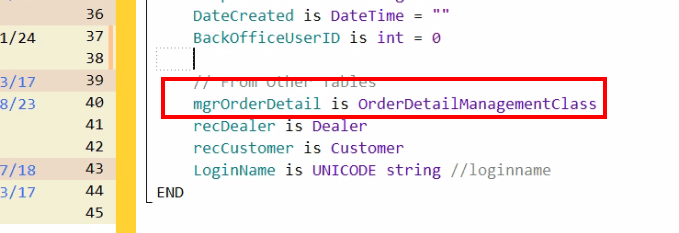
First, in the declaration code of the OrderHeader record class, we add the manager for OrderDetail
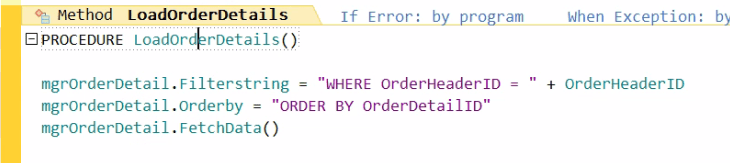
Then we create a method to load the correct OrderDetail records for this Order
And finally, we create a property in the record class to provide us with the sum.
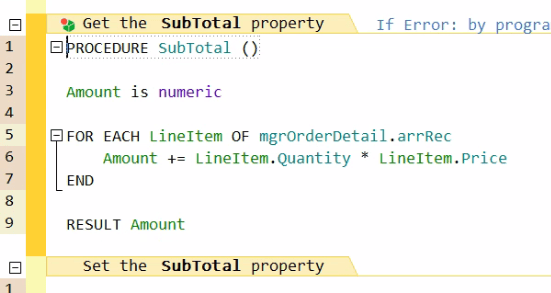
Note, it is a ReadOnly Property, as it makes no sense to update the value manually.
Now in our code, we can retrieve the Header and Detail and have the Subtotal available with just a few lines of code.
mgrOrderHeader is OrderHeaderManager
recOrderHeader is OrderHeader = mgrOrderHeader.RefreshByID(?)
recOrderHeader.LoadOrderDetails()
Info("The Subtotal is " + recOrderHeader.SubTotal)
That is it. And because this is a property, it can be referenced like any other variable, including being bound to a screen control. For example, if you want to show the subtotal on the order form
You could of course include IF statements within the loop if you only want to conditional include some of the records in your calculation.
And before you start wondering about the performance of recalculating the subtotal every time it is referenced, structured arrays perform amazingly well in WX. Even with thousands of records, it is nearly instant.
In this example, I placed the property in the Parent record class. But this technique is just as useful in situations that are not Parent/Child relationships. For example, let’s say I want to show the # of active customers on my Customer Browse. I could add a property to the Customer Manager class
Procedure ActiveCustomers()

retVal is int
FOR EACH tmpRec OF arrRec
   IF tmpRec.Active
      retVal++
   END
END

RESULT retVal
And then in my code, or binding to a screen control all I have to do is reference mgrCustomer.ActiveCustomers
If you are familiar with Lambda, then you can use that syntax to make these properties with even less code, but to be honest, I find comfort in the more easy to read code, like above. But in case you are interested, I covered using the Lambda functions here.
 wxBlog - All things wx – Covering pcSoft products (WINDEV, WEBDEV, WINDEV Mobile)
Hi
My colleague and I are just starting to learn about Windev. Your posts have been very interesting and I’ve learned a few things, I loved the Map, Filter, Sum, Lambda part. But I would like to understand this example, would it be possible to provide the code? I tried the dropbox link but it’s already deleted and I can’t connect to the public SCM because I can’t enter the password, maybe I’m doing something wrong.
LikeLike
Sorry but I don’t see a dropbox link in either of the articles about Lambda? The article you are commenting on actually doesn’t have Lambda in it, and is about using Properties in our wxFileManager classes, it just mentions that you could replace the code in that property with Lambda code
The actual Lambda conversation is in this post https://blog.wxperts.com/2023/09/28/map-filter-sum-lambda/ but all the code for that example is in the article there is nothing to download
If you are talking about the wxFileManager itself. We are getting ready to release a new version of it very soon, along with a more organized method to download it.
LikeLike