
It’s been a while since we had a “Quick Tip from your Uncle Pete”. Let’s fix that!
Did you know you can use the scope keywords in the Initialization Event of a control? If so why the heck hadn’t anyone told me!
If you are wondering what a scope keyword is, that is the keywords such as: GLOBAL, PRIVATE, PROTECTED; that define the scope of the commands and variable definitions that follow. We mainly use them in the classes to control how the members, properties, and methods of the class are accessible.
But here’s another great use of the GLOBAL keyword. Let’s save I want to save the value of a control when entering it, in case I need to reset the value if the user cancels out of a type ahead lookup, or if I need to have logic in different events of the control, based on if other events have happened. Normally I would declare a variable global to the screen such as:
savValue is stringand then in the Entry Event of the control
savValue = MySelf.ValueSimple enough but in my old age I have become obsessed with code refactoring and the efficiency of code. One of the mantras, my mentoring clients have heard many times, is “Every Line of Code is the opportunity to introduce a new bug”
There are a few downsides to doing it the “old way”. The scope is the entire window, so that means if I need similar logic for 2 controls, I need to create 2 variables and ensure I don’t confuse the names. It opens up the opportunity to accidentally set the value outside of the control’s code, leading to a bug. And if you know me at all, you know I love copy and paste. If I copy this control to another window, I also have to go digging for that variable declared in the window’s global event.
Normally if I were to declare a variable in the Initialization Event of a control, its scope would just be that event. I would not be able to use the variable in any of the other events of the control because it would be out of scope and not available.
Enter the GLOBAL keyword to my rescue! I can declare the variable in the Initialization Event of the control like so:
GLOBAL
 savValue is string
Now the variable is available to all the Events of the control. I don’t have to worry about a clash on the variable name with another control. The control is self contained, so when I copy it to another window it has all the code it needs.
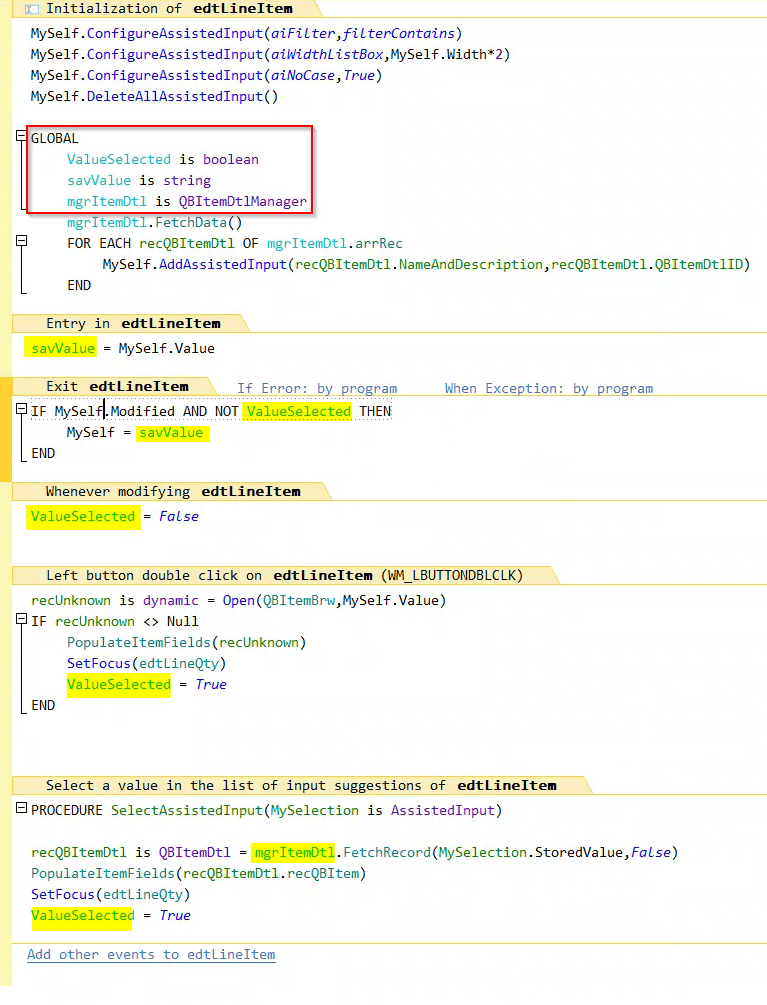
Here is a code section from a production application where I am putting this new found technique to great use. Hint this is also a preview of an upcoming post I am working on covering Assisted Input. In this screenshot, I surrounded the variables I declared Global to the control with a red box and then highlighted all the uses of the variables elsewhere in the control events. That is 3 variables that no longer need to be global to the screen and makes the control much more self contained!
 wxBlog - All things wx – Covering pcSoft products (WINDEV, WEBDEV, WINDEV Mobile)
Hi Pete
Nice tip, many thanks.
Was this example on on WD? I cant find the events on WB edit-control. Or where am I to look at?
Regards
LikeLike
This example was in WINDEV but the concept applies to both.
However WEBDEV Edit Controls do not have Server Events. If you were to look at a table control or button in WEBDEV you would have the similar events where you can use Global.
LikeLike