

The WL language boasts more functions than any other programming language I’ve encountered, not just a few more, but exponentially more. Today, we’ll explore GetColor(), a function that has been part of WL for a while. Surprisingly, I was not only unaware of its existence but also didn’t realize I needed it!
The Challenge
For a task management system, display the initials of the user assigned to each task as a badge. Use a unique color for each user, making it easier to identify tasks assigned to different users at a glance.
The Old School Approach
Add a field to the User database table to store the color associated with each user. When creating a new user, assign them a color randomly. Ensure that no two users have the same color and that all colors belong to a complementary palette that appears harmonious and not distracting. Just writing this specification is tiring, let alone managing all the work required to meet the specification and implement the change.
The WL Way
What does Uncle Pete always say? “If it’s hard you are probably doing it wrong!” While preparing to implement this feature into our wxKanban product, I stumbled upon this help page purely by chance.
The description says “Allows you to get a set of harmonious colors without having to use a table of colors.” That seems to be precisely what I need!
Digging deeper, we find out that the function takes two optional parameters:
- The first parameter is an integer, which is the subscript of the color to return. An interesting detail from the help page is, “If this parameter is specified, the same color will always be returned for a given subscript.” This implies that if we pass the UserID from our User table, the same color will always be returned for the same user. Additionally, two users will never have the same color. Just like that, half of our specification is already met simply by using this parameter!
- The second parameter is an optional constant that lets you choose a color palette. I selected the ‘colSetDark’ option, which provides a darker set of colors that perfectly suited my needs. With this, we have now met the other half of the specification!
💡 Alright, I confess I'm bending the rules slightly. If you have over 16,777,216 users, then two users will inevitably have the same color due to the RGB spectrum's limit. However, if you're dealing with that many users, you're likely facing more significant challenges than the GetColor() function!
Implementing It
If you were expecting some complex and elaborate code, you may have missed the point! The Old School Approach would have required that, but the WL Way is significantly simpler to implement!
As you might expect, wxKanban uses the wxFileManager. To return the color for the assigned user, I simply added a new property to the Task Record class.
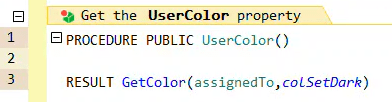
In the initialization code for my button, I simply set the background color to that property.
btnAssignedInitials.BackgroundColor = inTask.UserColor
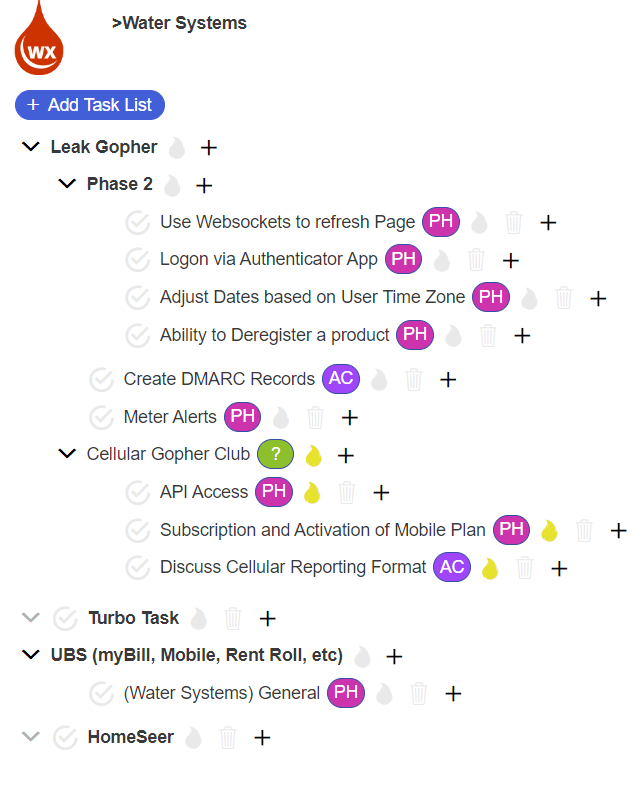
That’s it, we’re finished! Now, we can see the results of our work. Using the dark palette yields colors that look excellent against a white background.
Summary
The WL language’s GetColor() function simplifies the task of assigning unique, harmonious colors to users in our task management system. Instead of manually assigning and managing colors, GetColor() uses the user’s ID to consistently generate the same color. This approach reduces complexity and ensures that each user has a unique color, enhancing visual identification in the system.
 wxBlog - All things wx – Covering pcSoft products (WINDEV, WEBDEV, WINDEV Mobile)
Great tip, I just converted a lot of RGB functions that I had in some charts into Getcolor and Yes Indeed, one function replaces a bunch of RGB
Thanks Uncle Pete
El sáb, 6 abr 2024 a las 18:09, wxBlog – All things wx – Covering pcSoft
LikeLiked by 1 person